.png?width=1376&height=768&name=generated-image%20(7).png)

Missing details in meetings, lectures, and interviews is still one of the most common productivity problems on mobile. The best apps do more than record audio; they turn conversations into usable notes, searchable transcripts, and clear next steps without slowing you down.
That is exactly where AI Note Taker: Meeting Recorder makes a strong impression. Based on its App Store positioning, the app is built to help users capture audio in one tap, convert speech to text, generate concise AI summaries, and interact with recordings through follow-up questions.
Why this app stands out
After reviewing many apps in the note-taking and transcription category, one pattern appears again and again: a lot of tools do one task well, but few make the full workflow feel simple. Some are fine as voice recorders, some are useful for transcripts, and some are decent at summaries, but many feel fragmented when you need recording, understanding, and sharing in one place.
AI Note Taker: Meeting Recorder stands out because it is positioned as a complete capture-to-clarity workflow. Instead of stopping at raw audio, it combines high-fidelity recording, speech-to-text conversion, AI-generated summaries, action-item extraction, and chat-based follow-up in a single mobile experience.
That matters because convenience is not a minor feature in this category; it is often the deciding factor. An app that reduces friction between recording, reviewing, and sharing usually creates more real-world value than an app that offers isolated features but requires extra steps.
.png?width=254&height=550&name=screenshot-1%20(1).png)
.png?width=254&height=550&name=screenshot-2%20(1).png)
Benchmarked against typical alternatives
Compared with many basic voice recorder apps, AI Note Taker appears more useful for people who need outcomes rather than just stored audio. Recording alone is rarely enough for professionals or students; searchable text, summarized highlights, and decision tracking are what actually save time.
Similarly, after careful comparison with many standard transcription tools, this app appears more workflow-friendly because it is not only about converting speech into text. Its positioning around bullet-point summaries, extracted action items, speaker identification, and AI chat suggests a more practical review process than tools that leave users with a long transcript and little structure.
Among many cluttered productivity apps, the offering from AI Note Taker: Meeting Recorder app feels clearer and more direct. It emphasizes one-touch recording, background capture, keyword search, timestamp navigation, export options, and private handling of user data, which together create a focused value proposition instead of a bloated one.
Even as a single-purpose lecture recorder or interview transcription app, this AI Note Taker seems better balanced for mixed use. The beneficial audience spans executives, teams, students, journalists, writers, creators, and everyday users, which suggests a product designed for flexible real-life situations rather than a narrow niche.
Feature review
One-tap recording
This is one of the most important strengths in any mobile recording app. If users can start quickly, they are far less likely to miss the beginning of a lecture, interview, call, or meeting.
Transcription that becomes usable notes
A transcript is only valuable when it becomes easy to review. Here, the bigger advantage is the combination of speech-to-text, formatting, speaker identification, and readable structure, which makes the content more practical than a wall of text.
AI summaries and action items
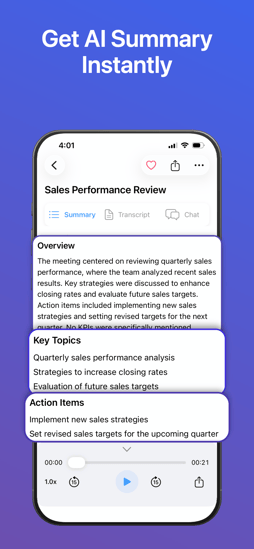
This is where the app has a strong appeal for busy professionals and students. Instead of replaying long audio files, users can move straight to overviews, key points, and next steps.
Ask-AI workflow
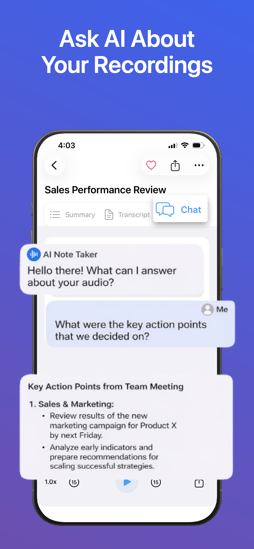
One of the more compelling differentiators is the ability to ask questions about a recording. That changes the experience from passive storage to active retrieval, which is especially useful when someone needs to know what was approved, who committed to what, or what the main takeaways were.
Search, timestamps, and export
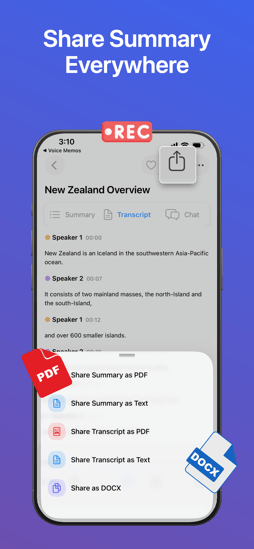
A note-taking app becomes much more valuable when information can be found and shared quickly. Keyword search, direct timestamp navigation, and export options such as PDF and text support a smoother handoff from capture to collaboration.
30+ languages support to become global
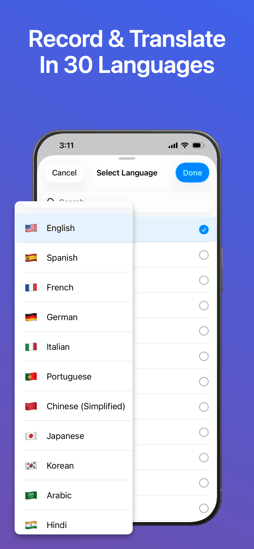
AI Note Taker doesn’t stop at English. It supports recording, transcription, and translation in 30+ languages, making it a powerful choice for international teams, multilingual classrooms, and users who regularly switch between languages. This broad language coverage means one app can handle global client calls, overseas lectures, and cross-border collaboration without extra tools.
 Who should download it?
-
Business professionals who want faster meeting summary creation and less manual note-taking.
-
Office teams who need searchable transcripts, decisions, and action items after discussions.
-
Students who want to study notes from lectures without trying to write everything in real time.
-
Journalists, writers, and researchers need cleaner interview transcription and easier review.
-
Content creators and solo users who want to turn spoken ideas into structured notes.
Best Suitable Use Cases for Anyone
-
Recording a client meeting and instantly reviewing the summary before sending a follow-up email.
-
Capturing a university lecture and revisiting the most important concepts through searchable notes.
-
Transcribing an interview and checking exactly who said what through speaker identification.
-
Reviewing a long strategy discussion by asking AI for decisions, action items, and core takeaways.
-
Exporting summaries and transcripts into shareable formats for colleagues, classmates, or clients.
Final Verdict
AI Note Taker: Meeting Recorder looks especially strong because it addresses the whole productivity chain: record, transcribe, summarize, search, ask, and share. The app’s App Store listing presents it as a privacy-conscious productivity tool for meetings, lectures, interviews, webinars, and personal notes, with core features centered on one-tap capture, AI summaries, action-item extraction, and interactive querying.
From an expert reviewer's perspective, that makes it more compelling than many alternatives that focus on only one part of the workflow. If you want a voice-to-text app that feels designed for real productivity rather than simple audio storage, this is the kind of iPhone app that deserves serious attention.
Download AI Note Taker: Meeting Recorder from the Apple App Store and turn recordings into clear, useful notes faster.